 Deutsch
 English
Boilsoft Screen Recorder
Dieses Programm wird Ihnen präsentiert von:
447 North 300 West Unit 2
84037 Kaysville
United States
| submit [at] boilsoft [dot] com | |
| Telefon | 801-111-1111 |
| Telefax | 801-111-1111 |
| Website | www.boilsoft.com |
| Support | www.boilsoft.com |
| Kategorie: | Audio & Multimedia / Präsentation Tools |
| Version: | 1.05.13 |
| Release-Datum: | 11.01.2013 |
| Größe: | 2,39 |
| Betriebssystem: | Win 7 / 2000 / XP |
| Anforderungen: | Microsoft DirectX 8.1 or later runtime, Microsoft Windows 98/ME/2000/XP/2003/Vista/Windows 7 |
| Sprachen: | Deutsch, Englisch |
| Downloads: | 3 im Juni / 543 insgesamt |
Bewertung: 1,38/10 (8 Stimmen abgegeben)
| Download: | www.boilsoft.net/download/bsscreenrecorder.exe |
| Mirror 1: | www.boilsoft.com/download/bsscreenrecorder.exe |
| Infoseite: | www.boilsoft.com/screenrecorder/index.html |
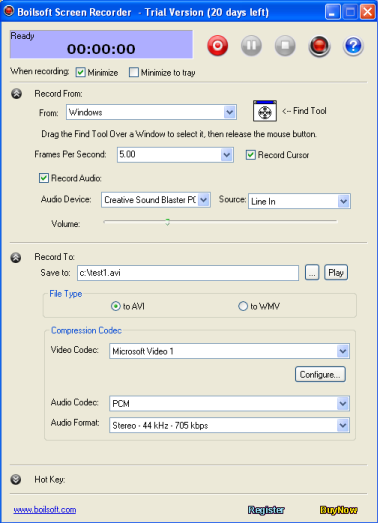
Boilsoft Screen Recorder can record selected view, entire desktop or game screen to AVI or WMV video format. In addition, this screen recorder can also capture audio from speakers, microphone or external lines.
Boilsoft Screen Recorder is the ideal partner who helps you make demo videos, capture streaming video, prepare business solutions, make training materials, record gameplay, and etc. Adjustable output settings and like video Codec, Bitrate, Audio Codec or Audio format allows you to get your desired video effect.
Key Features of screen recorder:
1. Capture and record video from full screen, windows, region or a fixed region.
2. Video Codec, Bitrate, Audio Codec or Audio format of output video can be full customized to get your desired effect.
3. Output to AVI file. You can choose the video compressor, and its compression quality. Supports DivX, XviD.
4. Previewing the record video is supported.
5. Supports recording to WMV file, all the video setting and audio setting can be configured.
6. Option to capture mouse cursor or not.
7. Record audio from any sources including the microphone, line-in, or speakers.
8. Start/stop recording with hotkey hit.
Boilsoft Screen Recorder can:
* Create demonstration videos for any software.
* Create video tutorials for students at multiple levels.
* Record a frequently-occured problem from your computer and you can use the video as a sample for technical support.
* Create video-based information products for online business
* Record your excellent performance in the game to show how cool you are.
* Develop multimedia materials that can be shown on TV or burnt to discs. Use them to promote your website or other products
System Requirements:
Windows 98 Second Edition, Windows ME, Windows 2000, Windows XP, Windows Vista and Windows 7
Direct X:
Version 8.01 or above.
Einblenden / Ausblenden
Hier können Sie die Update-Infos für dieses Programm abonnieren. Sie erhalten dann zukünftig eine Benachrichtigung per Email, sobald ein Update zu diesem Programm eingetragen wurde.
Um die Update-Infos zu abonnieren, tragen Sie nachfolgend Ihre E-Mail-Adresse ein. Sie erhalten dann eine E-Mail mit einem Link, über den Sie das Abo bestätigen müssen.
Sie können die Update-Infos jederzeit wieder abbestellen. Hierzu finden Sie am Ende jeder E-Mail mit Update-Infos einen entsprechenden Link.
Dieser Service ist für Sie vollkommen kostenlos.
Kommentare zu Boilsoft Screen Recorder
Einblenden / Ausblenden
Bisher gibt es keine Kommentare zu diesem Programm.
Selbst einen Kommentar schreiben