 Deutsch
 English
MEO File Encryption Software Pro
Dieses Programm wird Ihnen präsentiert von:
Suite 120
80111 Greenwood Village
United States
| E-Mail: | submissions.de [at] nchsoftware [dot] com |
| Telefon: | 1800 555 1234 |
| Website: | www.nchsoftware.com/de/index.html |
| Support: | www.nch.com.au/support/de/index.html |
| Kategorie: | Sicherheit & Datenschutz / Verschlüsselungs-Tools |
| Version: | 2.18 |
| Release-Datum: | 18.10.2016 |
| Größe: | 437 KB |
| Betriebssystem: | Win XP / Vista |
| Anforderungen: | Windows XP/Vista/7/8/10 |
| Sprachen: | Englisch |
| Downloads: | 4 im Mai / 132 insgesamt |
Bewertung: 2,00/10 (4 Stimmen abgegeben)
| Download: | http://www.nch.com.au/components/meosetup.exe |
| Mirror 1: | http://www.nchsoftware.com/encrypt/meosetup.exe |
| Infoseite: | http://www.nchsoftware.com/encrypt/index.html |
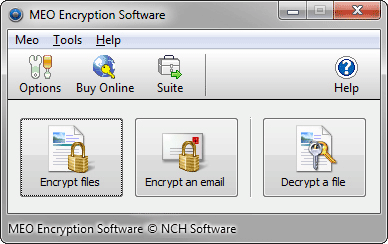
MEO is a powerful data encryption application to encrypt or decrypt files of any type, including Microsoft Word, Excel and PDF documents. MEO allows you to protect your sensitive data against un-authorized viewers by utilizing the latest data encryption technologies. Keep your documents safe and secure with this data encryption software.
With it's no-fuss and intuitive interface, MEO lets even the most inexperienced users protect their data quickly and easily. MEO also features the ability to create self-extracting encrypted files so the encrypted files can be opened on any Windows PC, even if MEO is not installed. All that is needed is the password to open these encrypted files.
Data Encryption Features:
* Easily encrypt data from a single click of a button
* Decrypt files that have been encrypted using MEO
* Create self-extracting encrypted files that are accessible from any Windows PC. All you need is the password.
* Encrypt or Decrypt entire folders of data
* Windows Explorer right-click menu integration
* Log all encryption operations automatically
* Create and verify checksums (MD5, SHA-1, Tiger Tree)
* Simple and intuitive interface
Hier können Sie die Update-Infos für dieses Programm abonnieren. Sie erhalten dann zukünftig eine Benachrichtigung per Email, sobald ein Update zu diesem Programm eingetragen wurde.
Um die Update-Infos zu abonnieren, tragen Sie nachfolgend Ihre E-Mail-Adresse ein. Sie erhalten dann eine E-Mail mit einem Link, über den Sie das Abo bestätigen müssen.
Sie können die Update-Infos jederzeit wieder abbestellen. Hierzu finden Sie am Ende jeder E-Mail mit Update-Infos einen entsprechenden Link.
Dieser Service ist für Sie vollkommen kostenlos.