 Deutsch
 English
NeoDownloader
Dieses Programm wird Ihnen präsentiert von:
PO BOX 968598
02068 Kiev
Ukraine
| info [at] neowise [dot] com | |
| Telefon | 380 445451549 |
| Telefax | +1111111111 |
| Website | www.neowise.com |
| Kategorie: | Netzwerk & Internet / Download-Manager |
| Version: | 6.0.0 |
| Release-Datum: | 01.10.2026 |
| Größe: | 178 |
| Betriebssystem: | Win 10 / 11 / Mac OS X / Linux |
| Anforderungen: | Windows 10 or 11 (64-bit), macOS 12 or later on Apple silicon or Intel, or 64-bit Linux (Ubuntu 22.0 |
| Sprachen: | Englisch |
| Downloads: | 4 im Oktober / 357 insgesamt |
Bewertung: 3,75/10 (8 Stimmen abgegeben)
| Download: | www.neodownloader.com/get/windows-x64 |
| Mirror 1: | www.neodownloader.com/get/windows-x64-portable |
| Mirror 2: | www.neodownloader.com/get/macos-arm64 |
| Infoseite: | www.neodownloader.com |
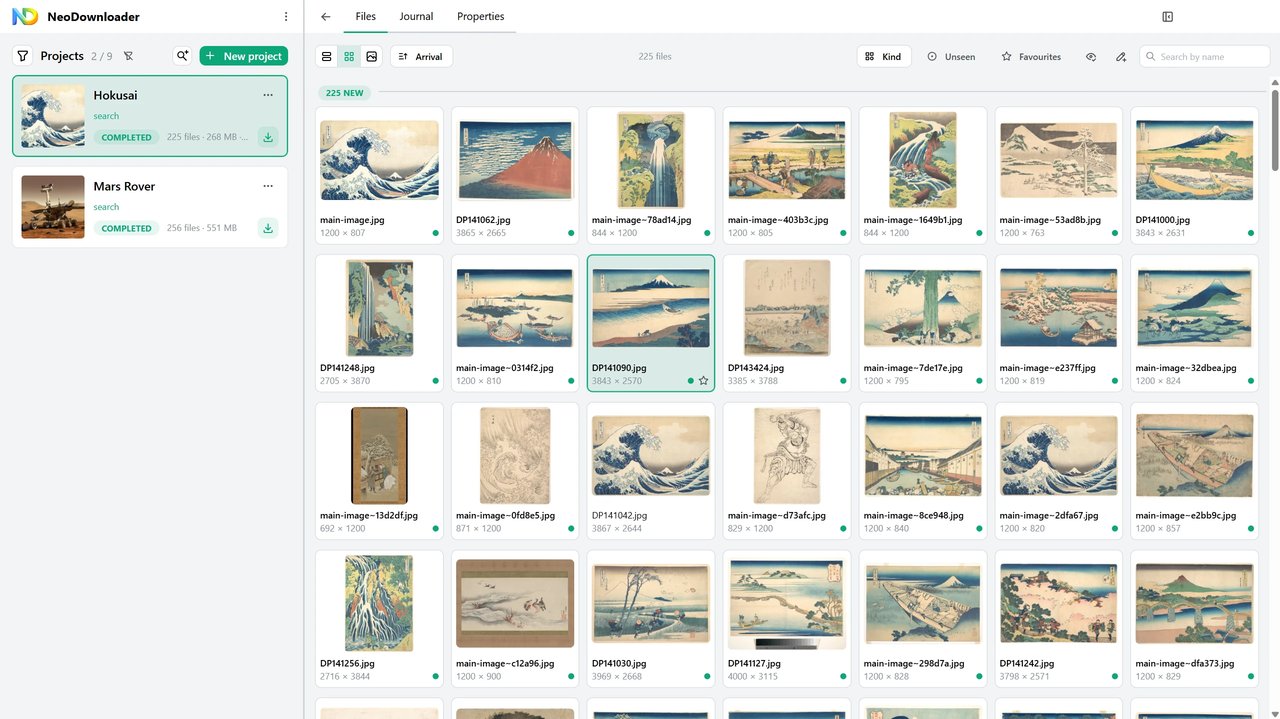
NeoDownloader downloads the pictures, photos and videos on a web page, a gallery or a whole site, and any other files you ask for. Paste one link or a list of hundreds, one per line, and it saves the files for you.
Version 6 is rewritten from the ground up.
Key features:
- 1,200+ supported sites: galleries from 300+ sites, and videos, playlists and channels from 900+ platforms
- Built-in Chromium browser: search Google Images, Bing, Flickr and more inside the app and download the results; sign in to a site once and later projects use it; pages that build themselves with JavaScript are read the way a browser shows them
- Built-in viewer and player: pictures at full size, 4K and 8K video, music, fullscreen and slideshow, even while a project is still downloading
- Projects with a run queue, tags and filters
- Several files at once, automatic retry, and interrupted downloads that resume where they stopped, even after the app was closed
- Link patterns: photo[1-50].jpg stands for fifty links
- Plugins and site parsers are open source under the MIT License, with a visual parser editor inside the app
- Thirteen interface languages
The free version takes 100 images, 10 videos and 10 other files per project, in up to 10 projects, with video up to 1080p - no time limit and no watermarks. Premium ($29.95, one-time) lifts those limits and allows video up to 8K.
NeoDownloader is self-contained: there is nothing else to install.
Einblenden / Ausblenden
Hier können Sie die Update-Infos für dieses Programm abonnieren. Sie erhalten dann zukünftig eine Benachrichtigung per Email, sobald ein Update zu diesem Programm eingetragen wurde.
Um die Update-Infos zu abonnieren, tragen Sie nachfolgend Ihre E-Mail-Adresse ein. Sie erhalten dann eine E-Mail mit einem Link, über den Sie das Abo bestätigen müssen.
Sie können die Update-Infos jederzeit wieder abbestellen. Hierzu finden Sie am Ende jeder E-Mail mit Update-Infos einen entsprechenden Link.
Dieser Service ist für Sie vollkommen kostenlos.
Kommentare zu NeoDownloader
Einblenden / Ausblenden
Bisher gibt es keine Kommentare zu diesem Programm.
Selbst einen Kommentar schreiben