 Deutsch
 English
Audio Comparer
This programme is presented to you by:
Sovetskaya, 36
392000 Tambov
Russian Federation
| author [at] bolidesoft [dot] com | |
| Phone | +1-847-329-9173 |
| Facsimile | +1-847-329-9173 |
| Website | www.bolidesoft.com |
| Category: | Audio & Multimedia / Other |
| Version: | 2.2 |
| Release date: | 2026-10-25 |
| Size: | 12 |
| OS: | Win 7 / 8 / 10 / 11 |
| Languages: | German, English |
| Downloads: | 17 in October / 258 in total |
Rating: 4.80/10 (5 votes cast)
| Download: | AudioComparer.com/software/ac_setup.exe |
| Infopage: | AudioComparer.com |
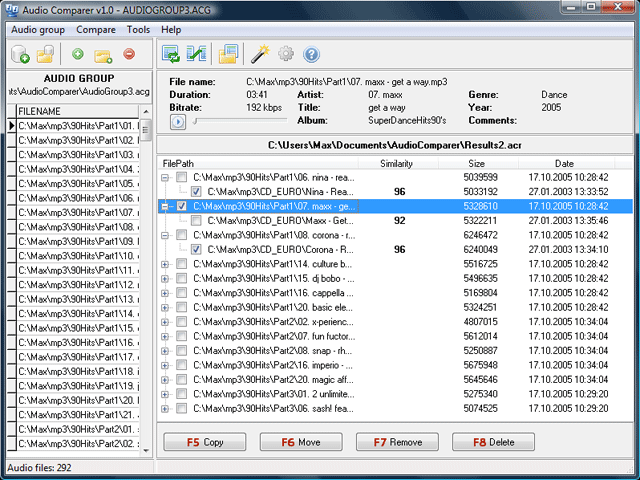
Audio Comparer is a must-have tool for every music lover. Even if your music collection is not large, there are surely several duplicates in there. Finding them by ear would be very hard work. Audio Comparer will do it for you.
No matter what audio format your songs have, and no matter if they have no tags at all. Audio Comparer does not need tags and does not care about the format. It listens to your audio files like a human ear and remembers your entire collection. Then it quickly locates duplicate and similar audio files, even when one copy is MP3 and another is FLAC, or when one starts a fraction of a second later. Whole-album images with a CUE sheet are understood too: every track of the image is compared as a separate song.
But which copy should you keep? The bitrate does not tell the whole story: a 320 kbps MP3 made from a 128 kbps file, or a FLAC made from an MP3, only looks better. Audio Comparer measures the real quality of every file: it detects transcoded MP3s, fake lossless and fake hi-res files, clipping, channel problems and damaged MP3 streams, and shows the real frequency band of each recording. Right after the comparison it offers to mark the extra copies automatically, keeping the best one in every group by the rules you set. You review the marks, listen to any doubtful pair side by side, and delete or move the rest in one click.
Show / Hide
Here you can subscribe for the update infos for this programme. You will then receive an e-mail notice each time an update has been submitted for this programme.
In order to subscribe for the update infos, please enter your e-mail address below. You will then receive an e-mail with a link, which you need to click in order to confirm you subscription.
You can unsubscribe from the list at any time. For this purpose, you will find a link at the end of each update info e-mail.
This service is completely free of charge for you.