 Deutsch
 English
Volume Serial Number Editor
Dieses Programm wird Ihnen präsentiert von:
300 Fourth Ave
98194 Seattle
Ukraine
| submit [at] krylack [dot] com | |
| Telefon | +12095556622 |
| Telefax | +12095556622 |
| Website | www.krylack.com |
| Kategorie: | System Utilities / Datei- & HDD-Management |
| Version: | 3.0.2 |
| Release-Datum: | 01.10.2026 |
| Größe: | 2,7 |
| Betriebssystem: | Win 7 / 8 / 10 / 11 / Server |
| Anforderungen: | Windows 7 SP1, 8, 8.1, 10 and 11, and Windows Server 2012 R2 or later (x86, x64 and ARM64). |
| Sprachen: | Englisch |
| Downloads: | 4 im Oktober / 171 insgesamt |
Bewertung: 4,25/10 (4 Stimmen abgegeben)
| Download: | dl.krylack.com/klvolsnedit.exe |
| Infoseite: | www.krylack.com/volume-serial-number-editor |
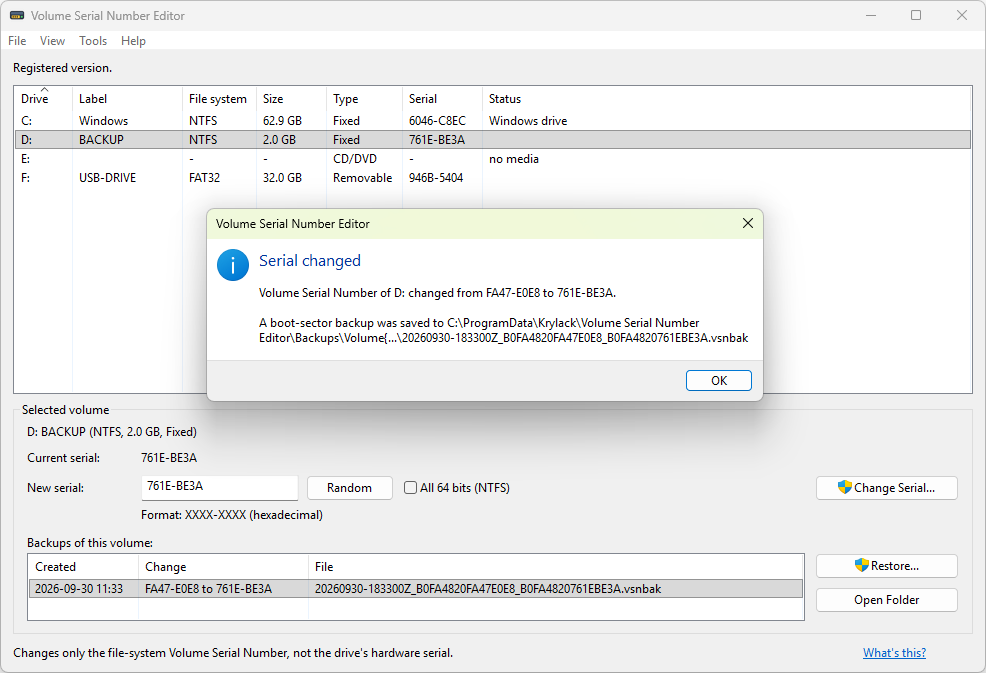
Volume Serial Number Editor is a Windows tool that views and changes the Volume Serial Number of your disks and drives. The Volume Serial Number is a short ID, shown as XXXX-XXXX, that Windows assigns to a volume when it is formatted. It is the value you see with the vol command or in a drive's Properties, and it belongs to the file system, separate from the drive's physical hardware serial. This tool changes it directly, without reformatting. Use it to restore a serial after reformatting or reinstalling, so your own backups, scripts and drive-specific settings that refer to a volume by its serial keep working. Fix duplicate serials left by disk cloning or imaging, where two volumes end up identical, by giving each one its own. Or standardize serials across a fleet of machines for IT asset tracking and inventory scripts. It supports FAT, FAT32, exFAT and NTFS, including the full 64-bit NTFS serial, and works with BitLocker-encrypted drives, including the Windows drive, while they are unlocked. The serial is written through BitLocker and the encryption is untouched. It backs up the boot sector before every change and verifies the result, rolling back automatically if anything fails, and the installer and application are code-signed. A command-line edition, volsn, with JSON output, is available for scripting and automation. It runs on Windows 7 through 11, in 32-bit, 64-bit and ARM64 editions. It changes only the file-system Volume Serial Number, not the drive's physical hardware serial, your files, or anything outside the boot sector. Use it only on drives you own or are authorized to manage.
Einblenden / Ausblenden
Hier können Sie die Update-Infos für dieses Programm abonnieren. Sie erhalten dann zukünftig eine Benachrichtigung per Email, sobald ein Update zu diesem Programm eingetragen wurde.
Um die Update-Infos zu abonnieren, tragen Sie nachfolgend Ihre E-Mail-Adresse ein. Sie erhalten dann eine E-Mail mit einem Link, über den Sie das Abo bestätigen müssen.
Sie können die Update-Infos jederzeit wieder abbestellen. Hierzu finden Sie am Ende jeder E-Mail mit Update-Infos einen entsprechenden Link.
Dieser Service ist für Sie vollkommen kostenlos.
Kommentare zu Volume Serial Number Editor
Einblenden / Ausblenden
Bisher gibt es keine Kommentare zu diesem Programm.
Selbst einen Kommentar schreiben