 Deutsch
 English
Sysax FTP Automation
This programme is presented to you by:
PO BOX 290401
33687 Tampa
United States
| sysaxserver4 [at] sysax [dot] com | |
| Website | www.sysax.com |
| Category: | Network & Internet / FTP Clients |
| Version: | 7.02 |
| Release date: | 2026-03-20 |
| Size: | 12.55 |
| OS: | Win 7 / 8 / 10 / 11 / Server / XP / Other |
| Requirements: | Windows 11/10/8/7/Vista/XP or Windows Server 2025/2022/2019/2016/2012/2008/2003/2000 |
| Languages: | English |
| Downloads: | 4 in October / 137 in total |
Rating: 2.50/10 (8 votes cast)
| Download: | www.sysax.com/download/sa_sysaxauto_setup.msi |
| Infopage: | www.sysax.com/ftpauto |
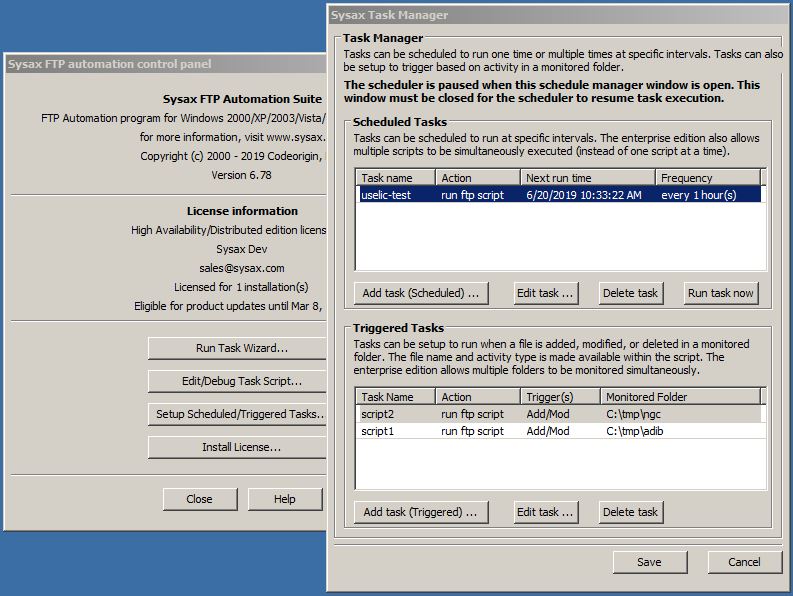
Sysax FTP Automation is Windows software that runs file transfers without anyone at the keyboard. A plain-text task script defines the job once: connect over SFTP, FTPS or FTP, upload or download, then process the files. The built-in scheduler, which runs as a Windows service, or a monitored folder starts the job from then on.
A task wizard generates scripts for uploads, downloads, backups, mirroring, two-way synchronization and folder comparison. The integrated editor and debugger step through a script line by line, so a job can be tested before it is scheduled.
Files can be processed before or after the transfer: OpenPGP encryption and decryption, zip compression, renaming, copying, moving and deleting, and running other programs. Email notification reports the outcome, and detailed log files record every step.
Connections can use password or SSH public key authentication and client-side SSL certificates. Scripts also run directly from the command line or a batch file, sysaxftp.exe is a secure drop-in replacement for the ftp.exe that ships with Windows, and a COM object lets other programs and scripting languages drive transfers.
The download includes a 30-day trial of the Enterprise edition features. Commercial licenses are a one-time purchase that includes a year of updates and support, and a free Personal edition is available for non-commercial use.
Show / Hide
Here you can subscribe for the update infos for this programme. You will then receive an e-mail notice each time an update has been submitted for this programme.
In order to subscribe for the update infos, please enter your e-mail address below. You will then receive an e-mail with a link, which you need to click in order to confirm you subscription.
You can unsubscribe from the list at any time. For this purpose, you will find a link at the end of each update info e-mail.
This service is completely free of charge for you.