 Deutsch
 English
Big FAT32 Format
Dieses Programm wird Ihnen präsentiert von:
302, Avenue Georges Clemenceau
92024 NANTERRE
France
| support [at] bureausoft [dot] com | |
| Website | www.bureausoft.com |
| Support | www.bureausoft.com |
| Kategorie: | System Utilities / Datei- & HDD-Management |
| Version: | 2 |
| Release-Datum: | 30.11.2025 |
| Größe: | 724 |
| Betriebssystem: | Win 7 / 8 / 10 / 11 / Server / XP |
| Anforderungen: | Windows 11,10,8,7,Vista,XP,2000,Server |
| Sprachen: | Deutsch, Englisch |
| Downloads: | 0 im Juni / 41 insgesamt |
Bewertung: 1,29/10 (7 Stimmen abgegeben)
| Download: | www.bureausoft.com/BigFAT32Setup.exe |
| Infoseite: | www.bureausoft.com/big-fat32-format-tool.html |
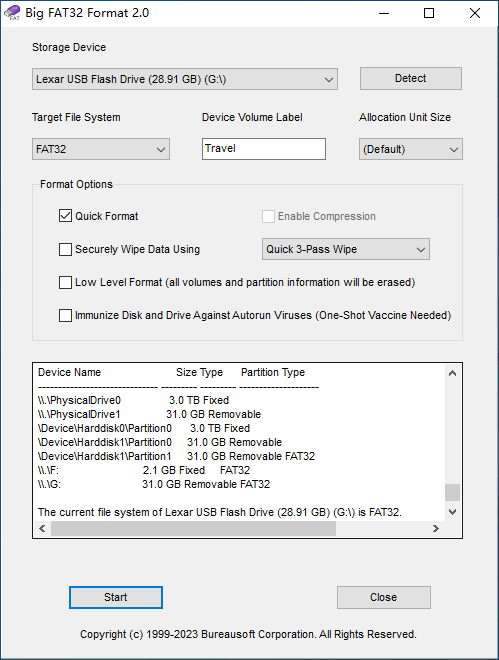
The capacity of USB storage device keeps growing every year. Have you ever tried formatting a high-capacity USB flash drive, SD Card, MicroSD Card, TF Card (TransFlash Card), or a SSD (Solid State Drive) in FAT32 file system on Microsoft Windows? The built-in Format program does not provide FAT32 as one of the available options for your drive. Microsoft Windows suggests you to format a disk/drive larger than 32GB in either NTFS or ExFAT file system. The largest FAT32 volume that Windows can create is 32GB. However, modern versions of Windows can read large FAT32 drives fine.
There are other methods to make larger volumes, since the theoretical max is 2TB for FAT32, but you would find support for large FAT32 volumes to be sparse. In most cases, an error message saying The Volume Is Too Big for FAT32 pops up before the Format operation completes.
The software is an innovative formatter to format high-capacity drives in FAT32 file system. As its name indicates, the software is capable of formatting USB drive, MicroSD, TF Card, and hard drive for up to 2TB. The formatter is monumentally fast, so you don't need to worry about whether it freezes through the process.
The software allows quick format, which completes disk drive format in a split second. If you would like to erase all the data on the drive, simply choose slow format and optionally securely wipe data using an algorithm of industrial strength. For high-capacity drive, the software features an option namely low level format that thoroughly erases all volumes and partition table information. Users can easily adjust the sector size to achieve best compatibility with electronic devices, such as a DVR (Digital Video Recorder), dashcam (dashboard camera), carcorder (car recorder), driving recorder, drone, UAV (Unmanned Aerial Vehicle), handheld game console, smart TV or a car stereo.
In addition to FAT32, Big FAT32 Format formats MicroSD, TF card, hard drive, and USB storage devices in NTFS and ExFAT file formats.
Einblenden / Ausblenden
Hier können Sie die Update-Infos für dieses Programm abonnieren. Sie erhalten dann zukünftig eine Benachrichtigung per Email, sobald ein Update zu diesem Programm eingetragen wurde.
Um die Update-Infos zu abonnieren, tragen Sie nachfolgend Ihre E-Mail-Adresse ein. Sie erhalten dann eine E-Mail mit einem Link, über den Sie das Abo bestätigen müssen.
Sie können die Update-Infos jederzeit wieder abbestellen. Hierzu finden Sie am Ende jeder E-Mail mit Update-Infos einen entsprechenden Link.
Dieser Service ist für Sie vollkommen kostenlos.
Kommentare zu Big FAT32 Format
Einblenden / Ausblenden
Bisher gibt es keine Kommentare zu diesem Programm.
Selbst einen Kommentar schreiben