 Deutsch
 English
Network Asset Tracker Pro
This programme is presented to you by:
Pacific Business Centre
98124-1069 Seattle
United States
| sales [at] misutilities [dot] com | |
| Phone | 206-309-0821 |
| Facsimile | 206-984-3919 |
| Website | www.misutilities.com |
| Category: | Network & Internet / Network Monitoring |
| Version: | 5.0.3 |
| Release date: | 2026-07-01 |
| Size: | 16.04 |
| OS: | Win 7 / 8 / 10 / 11 / Server |
| Requirements: | WMI (Windows Management Instrumentation) |
| Languages: | English |
| Downloads: | 1 in July / 146 in total |
Rating: 1.71/10 (7 votes cast)
| Download: | www.misutilities.com/natrackerpro5_install.exe |
| Mirror 1: | www.misutilities.com/natrackerpro5_install.exe |
| Infopage: | www.misutilities.com |
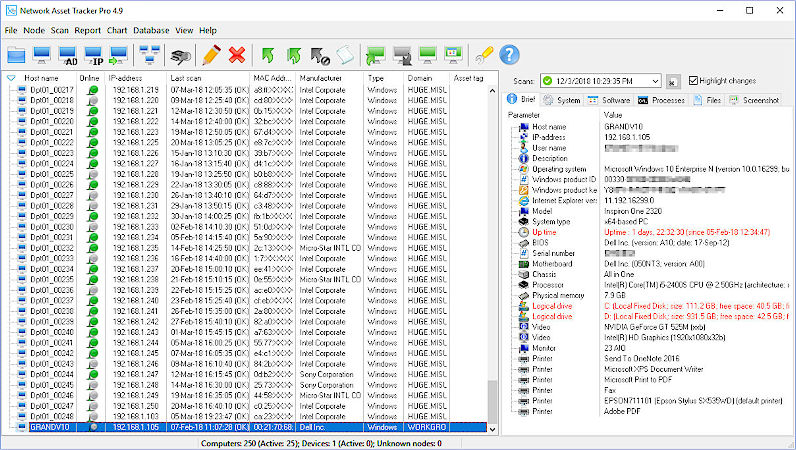
Network Asset Tracker Pro is a comprehensive network inventory solution that enables you to scan all the nodes of your network with just one click. Get complete information about operating system, service packs, hotfixes, hardware and software on Windows, Linux and macOS computers and SNMP network devices. You can capture a full-size screenshot of any remote desktop. Powerful reporting module helps you save a lot of time for preparing asset reports.
Five Ways To Scan Your Network:
Immediate online scan via WMI (agentless method);
SSH scan for Linux and macOS computers (agentless);
SNMP scan for network devices (printers, switches, routers);
Immediate online scan using "NAT Pro - Agent" (agent-based method);
Inventory using logon script.
Storing Inventory Data In Database
You can track changes in inventory data using history of scans. The database can reside on SQLite (default, no database server required), Microsoft Access, Firebird, Microsoft SQL Server or Oracle.
Software inventory:
Operating system type, version, build, product key and product ID;
Service packs and hotfixes;
Shared resources;
Startup programs;
Product keys and versions of installed software;
BitLocker encryption status;
Running processes.
Software License Compliance (new in 5.0.3):
Automatic software recognition, license and entitlement tracking, compliance reporting (installed vs. owned), renewal and expiry alerts, spend and savings insights, unauthorized software detection.
Inventory of SNMP-enabled Network Devices:
Description, up time, services, network printers' status and cartridge (ink/toner) levels.
Windows Service for background scanning and automatic network discovery.
Data Reporting:
Export reports in HTML, MS Excel, CSV, RTF and PDF formats.
Show / Hide
Here you can subscribe for the update infos for this programme. You will then receive an e-mail notice each time an update has been submitted for this programme.
In order to subscribe for the update infos, please enter your e-mail address below. You will then receive an e-mail with a link, which you need to click in order to confirm you subscription.
You can unsubscribe from the list at any time. For this purpose, you will find a link at the end of each update info e-mail.
This service is completely free of charge for you.